
For everyone who tells stories with sound.
Whether you teach, tell stories, direct voices or make videos, the studio is already open.
Classrooms recording at once with no logins or setup hassle.
Direct remote guests and actors live onto your project timeline.
Clean location audio, split music stems, and invent fresh Foley.
A whole class recording in minutes.
No software to install on the school computers. No accounts to create one by one. No training session to give.
Print a card for each student. They scan it with a camera and they are in. No email address needed. The whole class can sign in at the same moment.
Guided tours walk each student through recording, cutting and sharing, at their own pace. A tip of the day teaches one small trick at every session. Basic mode shows only the essential tools. Advanced tools appear when the class is ready.
Record your first voice take
Press the big microphone button when you are ready to speak.
Everything teachers need to distribute material and grade without missing files.
Shared sound collections
Prepare the sounds for an assignment once. Every student finds them and drags them onto a track.
Hand-in shelves
Students publish their finished project to the class shelf. You open it and listen, with nothing missing.
Group work
Students work on the same project from home, and can record each other remotely.
Emma - History Podcast Ep 1
Liam - Sound Design Exercise
Group 3 - Radio Play Final
Put your school's name and logo on the studio, the sign-in page and the emails. Available in English, French and Dutch.
Record anyone, anywhere. Finish it together.
The guest is abroad. The actor is at home. The producer is on the train. Everyone works in the same project.
Send a link. They record with their own microphone, straight onto your track. You watch the take arrive. They can hear the project while they record, so they stay in time.
A read that runs long? Shorten only the pauses and keep the voice natural, or remove all the silences in one click. Mood extraction colours the clip by tone of voice -- calm, upbeat, tense, subdued -- and speech to text adds the words as subtitles, so you find the right take without listening to them all.
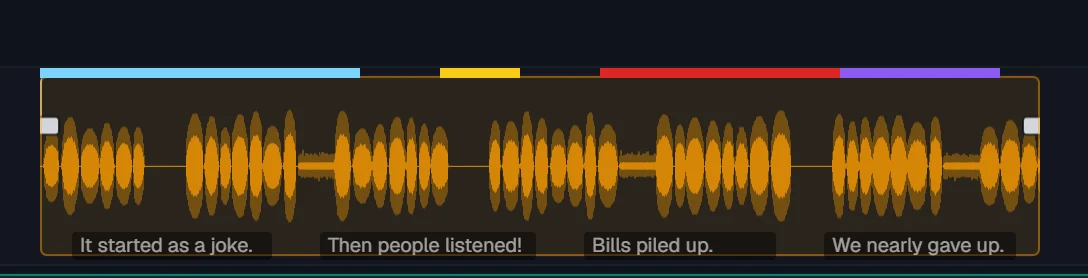
Clean up noise. Make a phone interview sound clear and bright again.
Edit with your co-host: one edits, the other takes over when it is their turn. Check the level on the master meter, in loudness units or on the classic peak scale, then render the episode to a file.

Great picture deserves great sound.
Fix what the camera microphone recorded, add what it missed, and make it all fit the edit.
Wind, traffic, hum: remove the background and keep the voice.
Split any music into voice, drums, bass and the rest. Keep the instruments under your voice-over, or use only the drums.
Describe it: "a heavy wooden door creaking open". It arrives on your track.
Make a sound longer or shorter without changing how it sounds. Make a voice-over land exactly on the cut by adjusting only the pauses.
Whatever you make, start here.
Start for freeTalk to us about your school or your teamNothing to install. No card needed.